How to Turn Product Photos Into AI Video Ads
Use image-to-video workflows to transform static product photos into social-first video creatives
Turn Product Photos Into
Create product demos, UGC-style creatives, and social video ads from static product images
Product photos are no longer limited to static ecommerce galleries. With image-to-video AI workflows, a single product image can become a short-form video ad, product demo, lifestyle clip, UGC-style creative, or campaign concept. Mujo AI helps creators, ecommerce brands, and marketing teams turn product photos into AI video ads by using the image as a visual starting point. Instead of generating a video from a blank prompt, you can preserve product identity, packaging, shape, color, and visual context while adding motion, camera movement, product interaction, or social-first storytelling. This guide explains how to use product images for AI video generation, what types of video ads you can create, how to structure prompts, and how to build repeatable workflows for social media, paid ads, ecommerce campaigns, and product launches.
Create AI Video Ads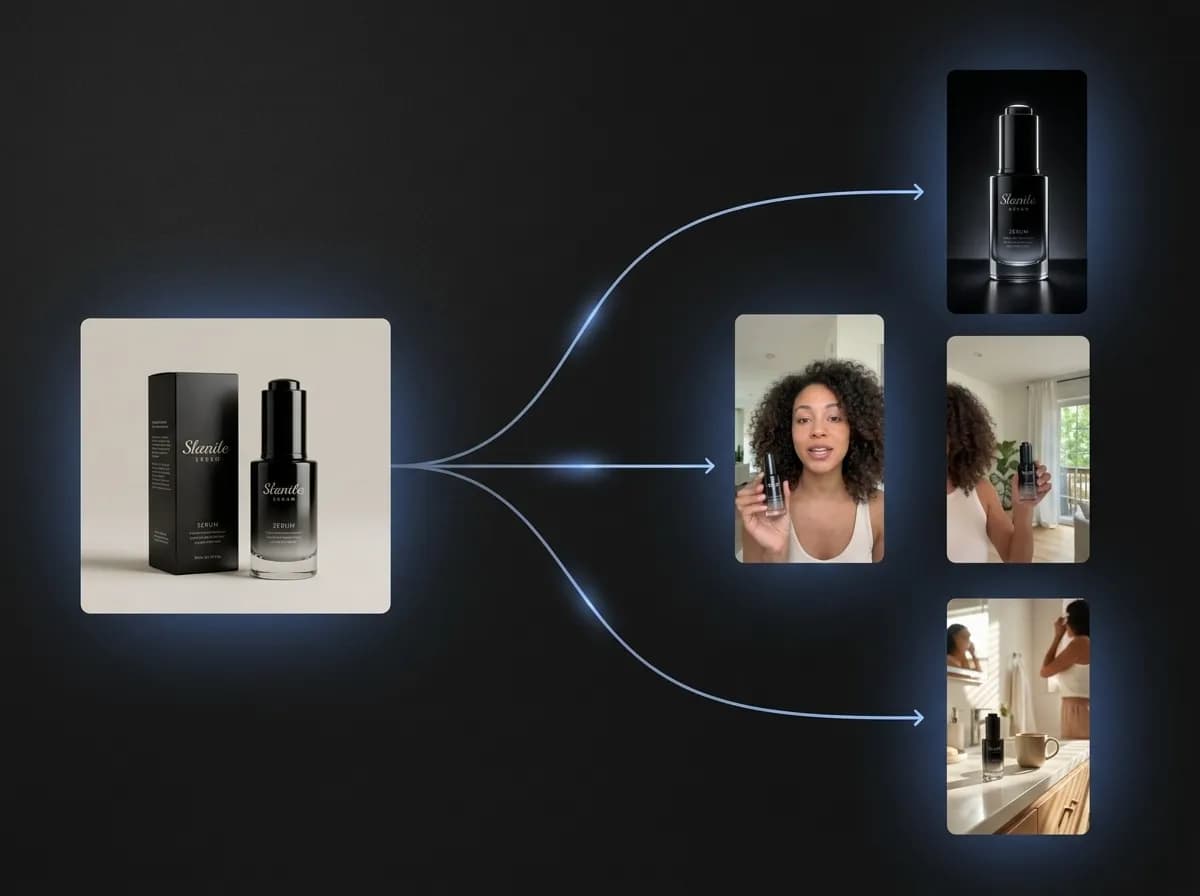
What does it mean to turn product photos into AI video ads?
Use a static product image as the visual foundation for motion, storytelling, and ad concepts
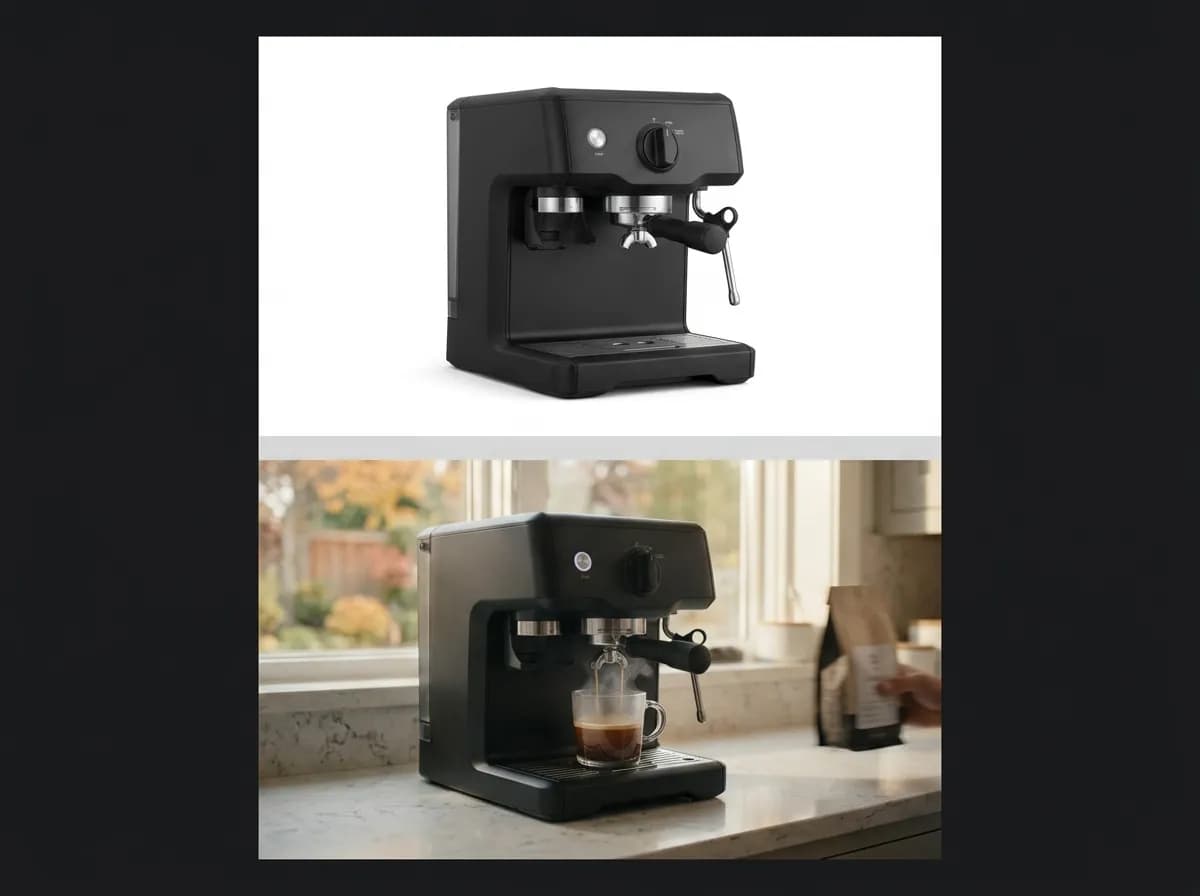
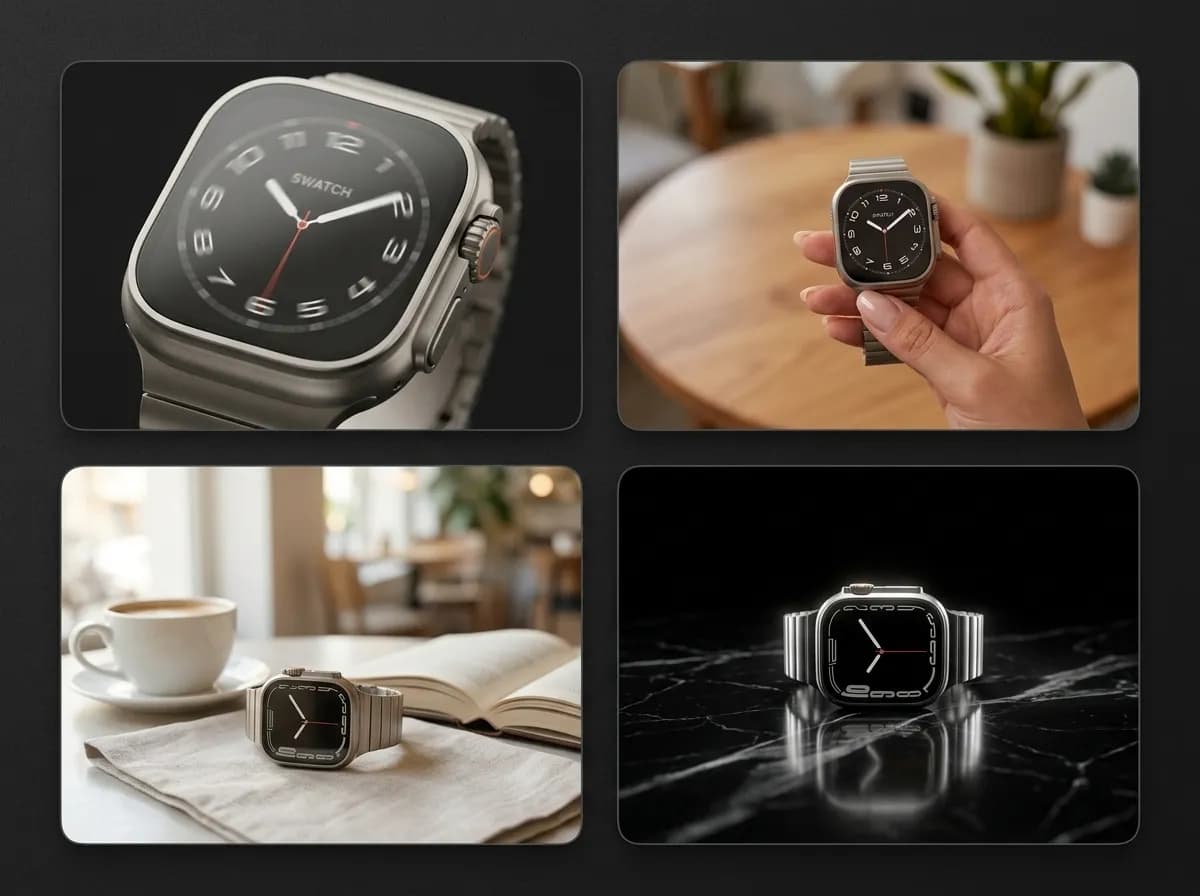
Turning product photos into AI video ads means using an existing product image as the starting point for video generation. The image provides the AI model with visual context: product shape, packaging, color, material, branding, composition, and sometimes the surrounding environment. From there, the AI can generate motion around the product. That motion might be a camera push-in, product reveal, hand interaction, lifestyle movement, unboxing moment, tabletop rotation, social-style demo, or cinematic campaign shot. This approach is especially useful because product identity matters. Text-to-video prompts can create strong scenes, but they may not preserve a real product accurately. Image-to-video workflows give the model a product reference, making the output more connected to the actual item you want to advertise. For ecommerce and performance marketing, this means static product assets can become video concepts without starting from a full production shoot.
Explore Image to VideoWhy product-photo-to-video workflows matter
Static product images can become scalable video ad systems
Explore UGC-Style Video CreativesReuse existing assets
Turn product photos, listing images, campaign visuals, or packaging shots into video concepts instead of starting from scratch.
Preserve product identity
Use the image as a visual reference so product shape, packaging, color, and details stay closer to the real item.
Create more ad variations
Generate multiple video directions from one product image for testing hooks, scenes, and creative angles.
Move faster than production
Explore product demos, UGC-style ads, lifestyle clips, and social video concepts before committing to a full shoot.
How to turn product photos into AI video ads
A simple image-to-video workflow for ecommerce, social, and performance creatives
Choose a clear product image
Start with a clean product photo, campaign image, packaging shot, lifestyle image, or listing visual where the product is easy to identify.
Define the video ad angle
Choose the creative direction: product demo, unboxing, UGC-style testimonial, lifestyle use case, product reveal, comparison, or problem-solution ad.
Write the motion prompt
Describe what should happen in the video: camera movement, product interaction, scene action, pacing, background, and social-first hook.
Generate video variations
Create multiple versions from the same product photo to test different angles, formats, motion styles, and campaign concepts.
Review product accuracy
Check whether packaging, shape, color, scale, and key product details remain clear and usable.
Save the strongest workflow
Reuse the best image-to-video setup across new products, campaigns, ad concepts, or social formats.
Types of AI video ads you can create from product photos
Turn one static image into multiple video creative directions
The strongest product-photo-to-video workflows start with a clear ad format. Instead of asking AI to simply animate a product, define what kind of video creative you want to test.
Explore Social Video AdsProduct demo videos
Show the product being used, opened, held, applied, placed, or demonstrated in a short-form ad format.
UGC-style video creatives
Create creator-style clips that feel social-native, product-focused, and closer to organic platform content.
Product reveal ads
Use motion, camera movement, and staging to reveal the product in a more cinematic or campaign-ready way.
Lifestyle product clips
Place the product into routines, home scenes, beauty setups, travel moments, desk setups, or everyday contexts.
Social video ads
Generate short-form creatives for TikTok, Instagram, Reels, Shorts, paid social, and product launch campaigns.
Feature-focused videos
Highlight a key product benefit, texture, material, packaging detail, use case, or visual selling point.
Image-to-video ads vs text-to-video ads
Why product photos are useful when product identity needs to stay clear
Text-to-video can be useful when you want to create a concept from scratch. But if the product itself matters, starting from a product photo gives the AI a stronger visual anchor. This is especially important for ecommerce, packaging, physical products, and branded campaign assets.
Explore Text to VideoWith product-photo-to-video
Start from a real product image or campaign visual
Preserve product identity more effectively
Create motion around existing ecommerce assets
Generate product demos, reveals, and lifestyle clips faster
Connect product pages, social posts, and video ads visually
Build repeatable workflows from one product input
With text-to-video only
Start from a blank prompt without visual product context
Higher risk of product details changing
More prompt work needed to describe shape, packaging, and materials
Harder to match an existing product photo or listing image
Less visual continuity between static and video assets
More trial and error for product-specific campaigns
Prompt structure for product-photo-to-video ads
How to write prompts that preserve the product while adding useful motion
A strong image-to-video prompt should explain the product role, the motion, the setting, the ad format, and the viewer takeaway. The goal is not random movement. The goal is motion that makes the product easier to understand or more compelling to watch.
Read AI Video Ads GuideInclude these in your prompt
Product role: what the product is and which details must stay visible
Video format: demo, UGC-style ad, reveal, lifestyle clip, or product feature video
Motion: camera push-in, hand interaction, product rotation, reveal, close-up movement, or scene action
Setting: studio, bathroom, kitchen, desk, outdoor, beauty setup, home scene, or lifestyle environment
Hook: what should grab attention in the first seconds
Output style: social-first, cinematic, natural, creator-style, commercial, or premium
Avoid these mistakes
Asking for generic animation without an ad goal
Changing the product too much from the reference image
Adding too many actions into one short video
Writing vague prompts like make it viral without scene detail
Ignoring the product’s scale, packaging, or key features
Using conflicting camera movement and scene instructions
Example prompts for turning product photos into AI video ads
Use these structures as starting points for different ad formats
These prompt examples show how to guide motion while keeping the product photo as the main visual reference.
Try These PromptsUGC-style product demo
Use the uploaded product photo as the exact product reference. Create a short creator-style video where a person naturally picks up the product, shows it to camera, and demonstrates how it is used in a casual social media setting. Keep the product shape, color, and packaging consistent.
Cinematic product reveal
Animate the product from the reference image with a slow camera push-in, soft cinematic lighting, premium background, subtle reflections, and a clean reveal motion. Keep the product centered and visually sharp.
Lifestyle social ad
Turn this product image into a short lifestyle video ad. Show the product placed naturally in a real home environment with gentle camera movement, warm lighting, and a social-first composition.
Feature-focused video
Use the product photo as reference and create a short video that highlights the main feature with close-up motion, clear product visibility, and polished ecommerce-style lighting.
Product photo to AI video ad workflow
Workflow need | With product-photo-to-video AI | Without image-to-video workflow |
|---|---|---|
Starting point | Use an existing product image as the reference | Start from a blank prompt or full production setup |
Product consistency | Better chance of preserving product identity | More risk of inaccurate product details |
Creative volume | Generate multiple video concepts from one image | Each concept requires more manual production |
Ad testing | Test demos, reveals, UGC-style clips, and lifestyle angles faster | Creative testing is slower and more expensive |
Asset reuse | Turn product photos and listing visuals into video ads | Static images stay separate from video production |
Campaign workflow | Connect product pages, social posts, and video creatives | Harder to maintain continuity across formats |
When to use this workflow
You already have product photos but need video ads for social platforms.
You want to test multiple product video concepts before production.
You need UGC-style creatives, demos, reveals, or lifestyle videos without starting from scratch.
Product-photo-to-video workflows are valuable because they connect static ecommerce assets with motion-based social advertising. This makes it easier to reuse existing content and create more campaign variations.
Best practices for product image to video generation
Use clear product references, simple motion, and focused ad goals
The best product-photo-to-video outputs usually start with a clean image and a clear video purpose. If the product photo is blurry, overly cluttered, distorted, or low-resolution, the generated video may struggle to preserve product details. Use images where the product is visible, well-lit, and easy to separate from the background. Then write prompts that describe what the motion should communicate. For example, a skincare product might work well as a bathroom counter reveal, a beauty routine clip, or a creator-style hand demonstration. A tech product might work better as a desk setup, close-up feature highlight, or cinematic product reveal. Keep the motion simple. Short AI video ads often work best when they focus on one idea: show the product, reveal a feature, demonstrate a use case, or create a strong first-second hook.
Explore Product Photos