AI Lighting Presets for Image Generation
Control cinematic, studio, editorial, and natural lighting in AI-generated images
AI Lighting Presets
Generate cinematic, studio, editorial, and natural lighting styles with consistent visual atmosphere
AI lighting presets help control how light behaves inside generated images. Instead of manually describing shadows, highlights, contrast, color temperature, and mood through prompt engineering, lighting presets provide structured lighting systems optimized for AI image generation. With Mujo Control Bar, creators can instantly apply cinematic lighting, soft studio light, editorial beauty setups, dramatic shadows, natural daylight, neon environments, and high-contrast visual styles across portraits, fashion photography, product images, social media creatives, AI headshots, and advertising campaigns. Lighting is one of the most important factors in image generation because it defines realism, depth, atmosphere, emotional tone, and overall image quality. AI lighting presets make these controls reusable, predictable, and visually consistent across multiple generations.
Try AI Lighting PresetsWhat are AI lighting presets?
Reusable lighting systems for AI image generation workflows
AI lighting presets are predefined lighting styles that guide AI image models toward a specific visual atmosphere. They help creators control shadows, highlights, brightness, contrast, reflections, depth, and mood without manually rebuilding prompts for every generation. In traditional photography and filmmaking, lighting shapes how a subject looks, how realistic a scene feels, and how emotions are communicated visually. The same applies to AI image generation. Lighting determines whether an image feels cinematic, commercial, editorial, dramatic, soft, natural, futuristic, or realistic. With Mujo AI Lighting Presets, users can apply professional lighting systems directly inside the image generation workflow. Instead of relying entirely on prompt interpretation, creators can use structured lighting controls to generate more predictable and visually coherent outputs. This is especially useful for creators working with AI portraits, AI fashion photography, AI product photography, AI advertising creatives, social media visuals, AI headshots, cinematic storytelling, and multi-image visual systems where consistency matters.
Explore AI Lighting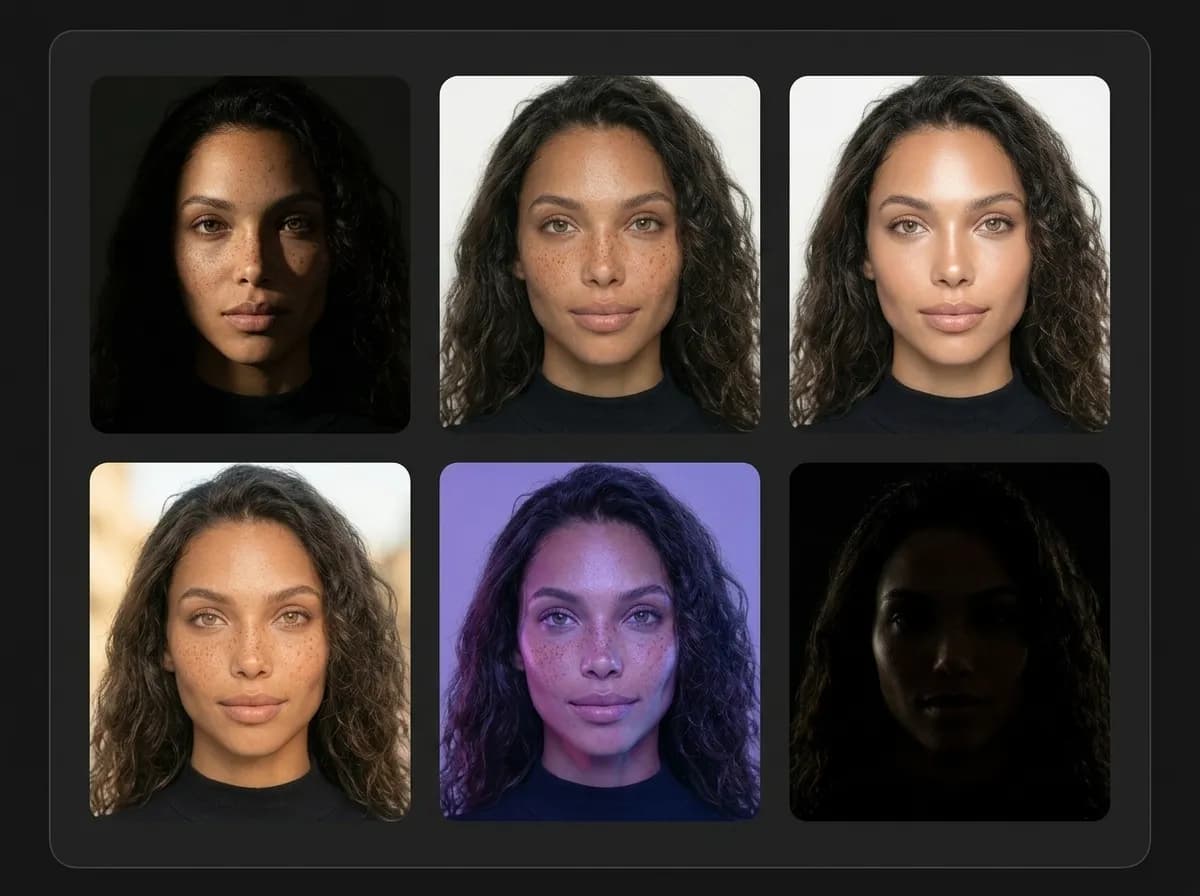
Types of AI lighting presets
Generate different lighting styles for different visual goals
Different lighting styles completely change how an AI-generated image feels. Mujo AI Lighting Presets allow creators to switch between cinematic, commercial, editorial, and natural lighting environments while maintaining a consistent visual workflow. Each preset affects contrast, color balance, brightness distribution, shadow softness, reflections, atmosphere, and overall visual mood.
Create AI Lighting StylesCinematic lighting
Film-inspired lighting with dramatic shadows, stronger contrast, and atmospheric depth for storytelling-focused visuals.
Studio lighting
Soft controlled lighting optimized for portraits, ecommerce product photography, commercial visuals, and professional headshots.
Editorial beauty lighting
Fashion-inspired lighting setups designed for clean skin tones, makeup detail, and magazine-style portrait aesthetics.
Natural daylight lighting
Balanced outdoor-inspired lighting with realistic brightness transitions and softer natural shadows.
Neon and RGB lighting
Stylized colored lighting environments for futuristic aesthetics, nightlife visuals, gaming-inspired scenes, and social content.
Low-key dramatic lighting
Dark high-contrast lighting focused on mood, depth, mystery, and cinematic atmosphere.
How AI lighting presets work
Create more consistent AI-generated images with structured lighting control
Where AI lighting presets are used
Professional workflows that depend on consistent lighting direction
AI lighting presets are useful across multiple creative workflows because lighting affects realism, emotional tone, and visual quality in every generated image.
Try AI Image LightingAI portraits
Generate more realistic skin tones, facial depth, and studio-quality portrait lighting.
Fashion editorials
Maintain cinematic and beauty lighting across fashion campaigns and editorial visuals.
AI product photography
Control reflections, highlights, and commercial presentation for ecommerce visuals.
Social media creatives
Create stronger atmosphere and more recognizable visual identity across posts and campaigns.
AI advertising creatives
Use cinematic and commercial lighting systems for higher-quality ad visuals.
AI headshots
Generate professional studio-style lighting without organizing real photoshoots.
Prompt tips for AI image lighting
How to create better cinematic, editorial, and studio lighting in AI-generated images
Try Lighting WorkflowBest workflow structure
Choose a lighting preset before refining the full prompt
Match lighting style to the purpose of the image
Use cinematic lighting for storytelling and atmosphere
Use studio lighting for products and commercial visuals
Generate multiple variations under one lighting system
Combine lighting presets with camera and pose controls
What to avoid
Mixing multiple conflicting lighting environments
Overloading prompts with technical lighting terminology
Changing lighting direction between generations
Ignoring contrast and color temperature
Trying to control every shadow manually through prompting
Using vague atmosphere descriptions without structure