GPT Image 2.0
Create structured AI images with advanced prompt understanding, accurate text rendering, and flexible editing workflows
Create Images with
An advanced AI image generator for structured visuals, accurate text rendering, and production-ready creative workflows
GPT Image 2.0 is a next-generation AI image generator designed to turn prompts and reference images into precise, high-quality visuals. Unlike traditional tools that rely on trial and error, GPT Image 2.0 understands structure, layout, and intent, making it a powerful solution for creators, marketers, and teams working with scalable visual content. Use it to create AI-generated ads, ecommerce product images, social media visuals, UI concepts, landing page graphics, and brand-driven creative assets in one organized workflow.
Start Creating Images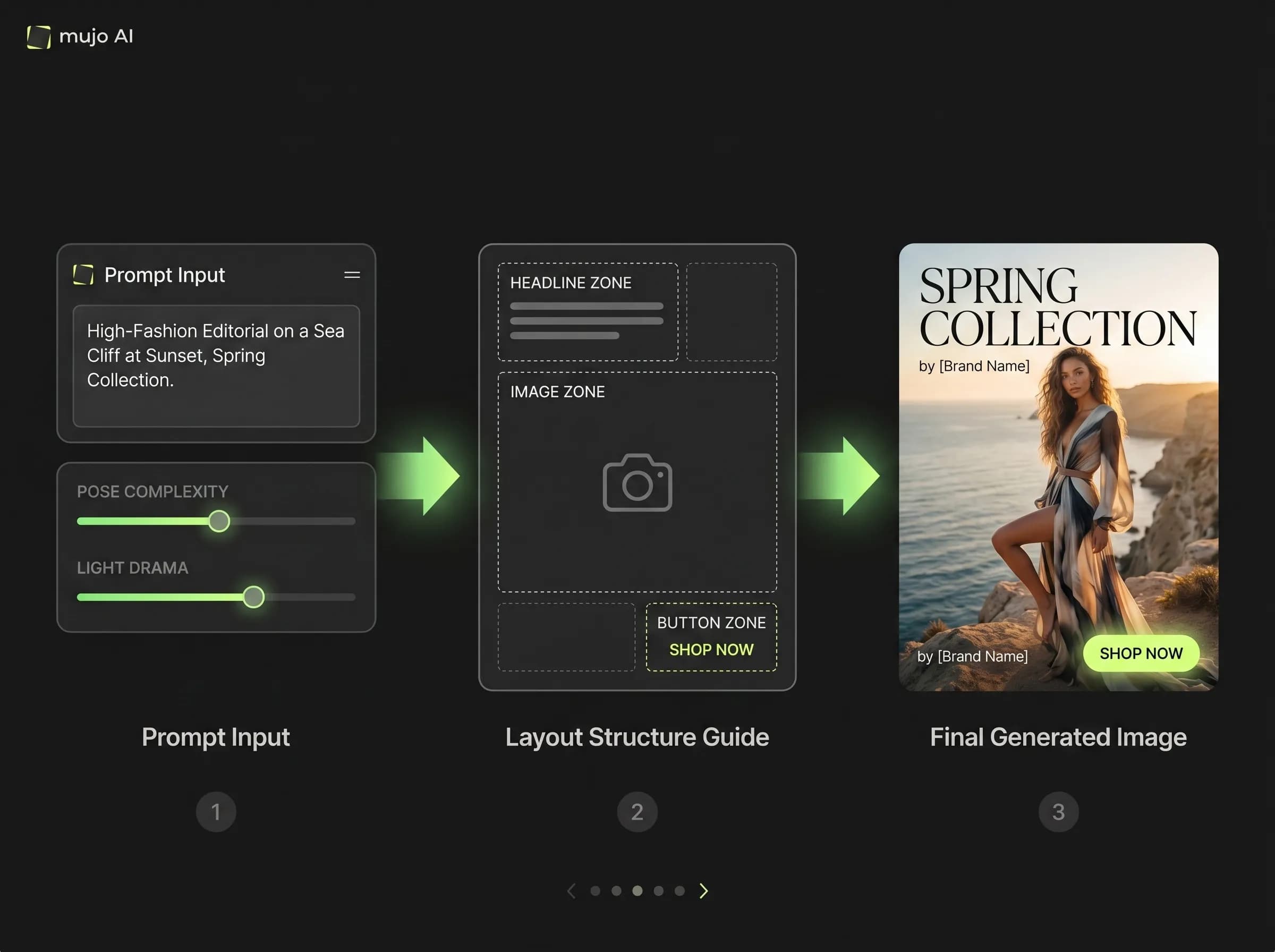
What is GPT Image 2.0?
A text-to-image and image-to-image model that combines reasoning with visual generation
GPT Image 2.0 is an advanced AI image model built for structured image creation. It interprets complex prompts, understands composition, and generates visuals that align closely with the intended result. Instead of producing random variations, GPT Image 2.0 helps users build a more controlled image creation workflow where prompts can be refined, references can be reused, and outputs can stay consistent across iterations. This makes it especially useful for marketing production, product design, content creation, and creative teams that need reliable image generation rather than one-off experiments.
Try GPT Image 2.0Why GPT Image 2.0 is different
Built for prompt accuracy, readable text, structured layouts, and faster creative iteration
Most AI image generators focus only on visual output. GPT Image 2.0 focuses on understanding before generating. This leads to more accurate compositions, better alignment with instructions, fewer regeneration cycles, and outputs that are easier to use in real workflows. For users searching for an AI image generator for ads, product images, social media graphics, or visual design, this difference is critical: the model does not just guess the image, it interprets the task.
Generate AI ImagesWith GPT Image 2.0
Generate structured images with stronger prompt understanding
Create visuals with accurate text rendering inside images
Define layout, object placement, visual hierarchy, and style direction
Edit images while preserving structure and composition
Use multiple references to guide style, consistency, and brand direction
Build repeatable image workflows instead of relying on random generations
With traditional image generators
Rely on trial and error to get usable results
Struggle with readable text, buttons, labels, and headlines
Lose structure when making small edits
Regenerate full images instead of refining specific elements
Get inconsistent characters, styles, or layouts across outputs
Spend more time fixing images in external design tools
Accurate text rendering inside images
Create visuals with readable headlines, labels, buttons, and call-to-action text
One of the most important improvements in GPT Image 2.0 is better text rendering inside images. Earlier AI image models often produced distorted letters, broken words, or unreadable typography. GPT Image 2.0 is much stronger at generating clear text for headlines, UI labels, buttons, product packaging, social media graphics, and advertising creatives. This makes it especially valuable for marketing teams and designers who need AI-generated visuals that can be used faster, without manually rebuilding every text element in another tool.
Create Text-Based VisualsWhat GPT Image 2.0 is useful for
Key use cases for modern creative, marketing, and image production workflows
GPT Image 2.0 works especially well when users need structured visual outputs, not just artistic experiments. It can support marketing campaigns, ecommerce visuals, brand content, interface concepts, and production-ready design exploration.
Start Image WorkflowAI marketing creatives
Generate ad visuals, banners, campaign concepts, and social media graphics with clear composition and readable text.
Product visuals
Create product images, ecommerce mockups, clean product compositions, and visual variations for testing.
UI and design concepts
Generate interface ideas, app screens, landing page hero visuals, layout concepts, and presentation-style assets.
Image editing workflows
Modify specific parts of an image, refine details, preserve composition, and iterate without starting from scratch.
Brand content systems
Use references and prompt structures to keep visual direction more consistent across multiple outputs.
Social media content
Create platform-ready image concepts for posts, carousels, thumbnails, and short-form campaign assets.
How to get better results with GPT Image 2.0
Practical prompting tips for cleaner, more consistent AI images
GPT Image 2.0 performs best when the prompt is structured around the final use case. Instead of describing only the visual style, define the purpose of the image, the layout, the subject, the environment, the lighting, and the text that should appear inside the image. This helps the model generate assets that are closer to real production needs.
Try These Prompt TipsBetter prompting approach
Describe the final format, such as Instagram ad, product hero image, landing page visual, or UI mockup
Define the subject, background, lighting, camera angle, and composition
Specify layout clearly, for example headline at the top, product centered, CTA at the bottom
Use short quoted text when adding words inside the image
Provide reference images when you need style, structure, or brand consistency
Iterate by editing specific parts instead of regenerating the whole image
What to avoid
Writing vague prompts without a clear use case
Adding long paragraphs of text that need to appear inside the image
Mixing too many unrelated styles in one prompt
Changing the full prompt when only one visual element needs refinement
Relying on random regeneration instead of controlled iteration
Ignoring layout instructions when creating structured visuals
Text-to-image and image-to-image in one workflow
Create new visuals from prompts or refine existing assets with reference-based generation
GPT Image 2.0 supports both text-to-image and image-to-image workflows. Users can start from a written prompt, generate a new visual, then refine it with edits or references. They can also start from an existing image and create variations, extensions, or controlled modifications. Combining both workflows makes the image creation process faster, more flexible, and easier to scale.
Open AI Image ToolText-to-image
Turn written prompts into fully generated visuals for ads, concepts, product scenes, creative tests, and design exploration.
Image-to-image
Start from an existing image and create variations, edits, extensions, or more polished versions of the same idea.
Reference-based generation
Use one or more reference images to guide style, structure, composition, product appearance, or brand direction.
Controlled iteration
Improve the same visual step by step instead of losing strong results through complete regeneration.
GPT Image 2.0 workflow value
Workflow need | GPT Image 2.0 | Traditional image tools |
|---|---|---|
Prompt understanding | Strong understanding of detailed prompts, layout, and intent | Often requires more trial and error |
Text rendering inside images | Better support for readable headlines, labels, and CTA text | Text is often distorted, misspelled, or unusable |
Structured outputs | Works well for ads, UI concepts, banners, product visuals, and layouts | Often stronger for artistic exploration than structured production |
Image editing | Supports controlled refinement and specific visual changes | Small changes may require full regeneration |
Reference-based generation | Can use references to guide style, composition, and consistency | Reference control may be less predictable |
Consistency across outputs | Stronger for repeated styles, visual systems, and campaign variations | Results can vary significantly across generations |
Best fit | Marketing creatives, product visuals, social media graphics, UI concepts, and design workflows | Loose ideation, artistic experiments, and single-image generation |
GPT Image 2.0 turns image generation into a structured and repeatable workflow. It is especially strong for users who need prompt accuracy, readable text, image editing, and consistency across multiple outputs.
What to keep in mind
GPT Image 2.0 is powerful, but the best results still come from clear prompts and controlled iteration
GPT Image 2.0 can dramatically improve image generation workflows, but complex layouts, very long text blocks, and highly specific brand systems may still require refinement. The model performs best when users give clear structure, concise text instructions, and reference images when precision matters.
Create AI ImagesBest conditions for strong results
Clear use case and output format
Short readable text inside the image
Specific layout and composition instructions
Strong references for brand, product, or style consistency
Step-by-step editing instead of constant full regeneration
Possible limitations
Very complex layouts may need several iterations
Long text inside images can still reduce quality
Exact brand replication may require additional control
Highly realistic outputs should be used responsibly
Final production assets may still need human review
From image generation to visual production
GPT Image 2.0 makes AI image creation more structured, repeatable, and useful for real workflows
GPT Image 2.0 is not just another AI image generator. It represents a shift from random image creation to controlled visual production. By combining prompt understanding, structured output, image editing, readable text, and reference-based generation, it helps creators and teams move from idea to usable asset faster. For marketing, ecommerce, social media, product design, and creative testing, GPT Image 2.0 turns image generation into a practical workflow instead of a one-time experiment.
Start Creating with GPT Image 2.0